1. LinuxCNC ausführen
LinuxCNC wird mit der Skriptdatei linuxcnc gestartet.
linuxcnc [options] [<INI-file>]
linuxcnc Skript Optionenlinuxcnc: Run LinuxCNC
Usage:
$ linuxcnc -h
This help
$ linuxcnc [Optionen]
Wählen Sie die Konfigurations-INI-Datei grafisch aus
$ linuxcnc [Optionen] Pfad/zu/Ihrer_INI_Datei
Benennen Sie die Konfigurations-INI-Datei anhand ihres Pfads
$ linuxcnc [Options] -l
Nutze die zuvor genutzte Konfigurations-INI-Datei
Options:
-d: Turn on "debug" mode
-v: Turn on "verbose" mode
-r: Disable redirection of stdout and stderr to ~/linuxcnc_print.txt and
~/linuxcnc_debug.txt when stdin is not a tty.
Used when running linuxcnc tests non-interactively.
-l: Use the last-used INI file
-k: Continue in the presence of errors in HAL files
-t "tpmodulename [parameters]"
specify custom trajectory_planning_module
overrides optional INI setting [TRAJ]TPMOD
-m "homemodulename [parameters]"
specify custom homing_module
overrides optional INI setting [EMCMOT]HOMEMOD
-H "dirname": search dirname for HAL files before searching
INI directory and system library:
/home/git/linuxcnc-dev/lib/hallib
Note:
The -H "dirname" option may be specified multiple times
Wenn das linuxcnc Skript eine INI-Datei übergeben wird, liest es die INI-Datei und startet LinuxCNC. Der Abschnitt der INI-Datei [HAL] gibt die Reihenfolge des Ladens der HAL-Dateien an, wenn mehr als eine verwendet wird. Sobald die HAL=xxx.hal Dateien geladen sind, wird die GUI geladen und dann die POSTGUI=.xxx.hal Datei. Wenn Sie PyVCP- oder GladeVCP-Objekte mit HAL-Pins erstellen, müssen Sie die postgui-HAL-Datei verwenden, um Verbindungen zu diesen Pins herzustellen. Siehe den Abschnitt [HAL] der INI-Konfiguration für weitere Informationen.
1.1. Konfigurationsauswahl
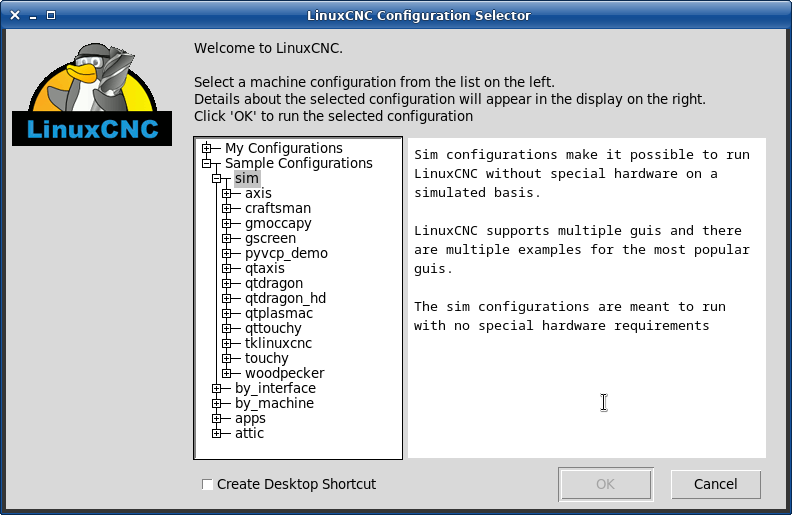
If no INI file is passed to the linuxcnc script it loads the configuration selector so you can choose and save a sample configuration. Once a sample configuration has been saved it can be modified to suit your application. The configuration files are saved in linuxcnc/configs directory.