
LinuxCNC может управлять макс. 8-ю шпинделями. Их количество задаётся в INI-файле. Все приведённые ниже примеры относятся к конфигурации с одним шпинделем и контактами управления шпинделями с именами типа spindle.0... В случае многошпиндельного станка всё, что меняется, — это наличие дополнительных контактов с именами типа spindle.6...
1. Скорость вращения шпинделя 0-10 В
If your spindle speed is controlled by an analog signal, (for example, by a VFD with a 0 V to 10 V signal) and you’re using a DAC card like the m5i20 to output the control signal:
Сначала необходимо определить масштаб скорости вращения шпинделя для управляющего сигнала, то есть напряжение. В этом примере максимальная скорость вращения шпинделя 5000 об/мин соответствует 10 вольтам.
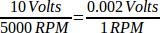
Нам необходимо добавить компонент масштабирования в файл HAL, чтобы масштабировать spindle.N.speed-out до диапазона от 0 до 10, необходимого VFD, если ваша карта ЦАП не поддерживает масштабирование.
loadrt scale count=1
addf scale.0 servo-thread
setp scale.0.gain 0.002
net spindle-speed-scale spindle.0.speed-out => scale.0.in
net spindle-speed-DAC scale.0.out => <имя контакта вашего ЦАП>
2. Скорость шпинделя ШИМ
If your spindle can be controlled by a PWM signal, use the pwmgen component to create the signal:
loadrt pwmgen output_type=0
addf pwmgen.update servo-thread
addf pwmgen.make-pulses base-thread
net spindle-speed-cmd spindle.0.speed-out => pwmgen.0.value
net spindle-on spindle.0.on => pwmgen.0.enable
net spindle-pwm pwmgen.0.pwm => parport.0.pin-09-out
# Set the spindle's top speed in RPM
setp pwmgen.0.scale 1800
При этом предполагается, что реакция контроллера шпинделя на ШИМ проста: 0% ШИМ дает 0 об/мин, 10% ШИМ дает 180 об/мин и т. д. Если для вращения шпинделя требуется минимальная ШИМ, следуйте примеру в образце конфигурации nist-lathe, чтобы использовать компонент шкалы.
3. Разрешить шпиндель
If you need a spindle enable signal, link your output pin to spindle.0.on. To link these pins to a parallel port pin put something like the following in your .hal file, making sure you pick the pin that is connected to your control device.
net spindle-enable spindle.0.on => parport.0.pin-14-out4. Направление вращения шпинделя
If you have direction control of your spindle, then the HAL pins spindle.N.forward and spindle.N.reverse are controlled by the G-codes M3 and M4. Spindle speed Sn must be set to a positive non-zero value for M3/M4 to turn on spindle motion.
Чтобы связать эти контакты с контактом параллельного порта, поместите в файл .hal что-то вроде следующего, убедившись, что вы выбрали контакт, подключенный к вашему устройству управления.
net spindle-fwd spindle.0.forward => parport.0.pin-16-out
net spindle-rev spindle.0.reverse => parport.0.pin-17-out
5. Плавный пуск шпинделя
If you need to ramp your spindle speed command and your control does not have that feature it can be done in HAL. Basically you need to hijack the output of spindle.N.speed-out and run it through a limit2 component with the scale set so it will ramp the rpm from spindle.N.speed-out to your device that receives the rpm. The second part is to let LinuxCNC know when the spindle is at speed so motion can begin.
В примере 0-10 Вольт линия
net spindle-speed-scale spindle.0.speed-out => scale.0.inизменяется, как показано в следующем примере:
Если вы раньше с ними не сталкивались, вот краткое введение в два компонента HAL, используемые в следующем примере.
-
limit2 — это компонент HAL (с плавающей точкой), который принимает входное значение и предоставляет выходное значение, ограниченное максимальным значением.
-
Near — это компонент HAL (с плавающей точкой) с двоичным выходом, который определяет, приблизительно ли равны два входных сигнала.
Более подробную информацию можно найти в документации по компонентам HAL или на страницах руководства, просто введите man limit2 или man near в терминале.
# load the real time modules limit2 and near with names so it is easier to follow their connections
loadrt limit2 names=spindle-ramp
loadrt near names=spindle-at-speed

# add the functions to a thread
addf spindle-ramp servo-thread
addf spindle-at-speed servo-thread

# set the parameter for max rate-of-change
# (max spindle accel/decel in units per second)
setp spindle-ramp.maxv 60

# hijack the spindle speed out and send it to spindle ramp in
net spindle-cmd <= spindle.0.speed-out => spindle-ramp.in

# the output of spindle ramp is sent to the scale in
net spindle-ramped <= spindle-ramp.out => scale.0.in

# to know when to start the motion we send the near component
# (named spindle-at-speed) to the spindle commanded speed from
# the signal spindle-cmd and the actual spindle speed
# provided your spindle can accelerate at the maxv setting.
net spindle-cmd => spindle-at-speed.in1
net spindle-ramped => spindle-at-speed.in2

# the output from spindle-at-speed is sent to spindle.0.at-speed
# and when this is true motion will start
net spindle-ready <= spindle-at-speed.out => spindle.0.at-speed
6. Обратная связь шпинделя
6.1. Синхронизированное движение шпинделя
Spindle feedback is needed by LinuxCNC to perform any spindle coordinated motions like threading and constant surface speed. LinuxCNC can perform synchronized motion and CSS with any of up to 8 spindles. Which spindles are used is controlled from G-code. CSS is possible with several spindles simultaneously.
Мастер StepConf может выполнить для вас подключения для конфигурации с одним шпинделем, если вы выберете в качестве входов фазу A энкодера и Z индекс энкодера.
Предположения относительно оборудования для этого примера:
-
К шпинделю подключен энкодер, который выдает 100 импульсов за один оборот в фазе А.
-
Фаза энкодера A подключена к контакту 10 параллельного порта.
-
Индексный импульс энкодера подключается к контакту 11 параллельного порта.
Основные шаги по добавлению компонентов и их настройке: сноска: [В этом примере мы предположим, что некоторые энкодеры уже назначены осям/сочленениям 0, 1 и 2. Поэтому следующий энкодер, который мы сможем присоединить к шпинделю, будет иметь номер 3. Ваша ситуация может отличаться.] footnote: [Включение индекса энкодера HAL является исключением из правила, поскольку он ведет себя и как вход, и как выход; подробности см. в разделе Encoder Section] footnote: [Так как выше мы выбрали неквадратурный простой подсчет…, мы можем обойтись квадратурным подсчетом без использования квадратурного входа B.]
# Add the encoder to HAL and attach it to threads.
loadrt encoder num_chan=4
addf encoder.update-counters base-thread
addf encoder.capture-position servo-thread

# Set the HAL encoder to 100 pulses per revolution.
setp encoder.3.position-scale 100

# Set the HAL encoder to non-quadrature simple counting using A only.
setp encoder.3.counter-mode true

# Connect the HAL encoder outputs to LinuxCNC.
net spindle-position encoder.3.position => spindle.0.revs
net spindle-velocity encoder.3.velocity => spindle.0.speed-in
net spindle-index-enable encoder.3.index-enable <=> spindle.0.index-enable

# Connect the HAL encoder inputs to the real encoder.
net spindle-phase-a encoder.3.phase-A <= parport.0.pin-10-in
net spindle-phase-b encoder.3.phase-B
net spindle-index encoder.3.phase-Z <= parport.0.pin-11-in
6.2. Шпиндель достиг скорости (Spindle At Speed)
To enable LinuxCNC to wait for the spindle to be at speed before executing a series of moves, the spindle.N.at-speed needs to turn true at the moment the spindle is at the commanded speed. To achieve this you need spindle feedback from an encoder. Since the feedback and the commanded speed are not usually exactly the same you should to use the near component to determine that the two numbers are close enough.
Необходимые соединения: сигнал команды скорости шпинделя – к near.n.in1, а сигнал скорости шпинделя – к near.n.in2. Затем сигнал near.n.out подключается к spindle.N.at-speed. Параметр near.n.scale необходимо настроить так, чтобы он указывал, насколько близко должны быть два числа друг к другу, прежде чем будет включен выход. В зависимости от конфигурации может потребоваться настройка масштаба для работы с вашим оборудованием.
Ниже приведены типичные дополнения, которые необходимо добавить в файл HAL для включения функции Spindle At Speed. Если в файле HAL уже есть сигнал Near, увеличьте его количество и скорректируйте код соответствующим образом. Убедитесь, что названия сигналов в файле HAL совпадают.
# load a near component and attach it to a thread
loadrt near
addf near.0 servo-thread

# connect one input to the commanded spindle speed
net spindle-cmd => near.0.in1

# connect one input to the encoder-measured spindle speed
net spindle-velocity => near.0.in2

# connect the output to the spindle-at-speed input
net spindle-at-speed spindle.0.at-speed <= near.0.out

# set the spindle speed inputs to agree if within 1%
setp near.0.scale 1.01